 English
 العربية
 বাংলা
বাংলা
 简体
简体
 Español
 Français
 Indonesia
 日本語
日本語
 한국어
한국어
 Melayu
 Português
 ภาษาไทย
 Việt Nam
 繁体
繁体
 اردو
اردو
 हिंदी
हिंदी

1. Open the MT4/MT5 on your PC and log-in to your Zero Account.
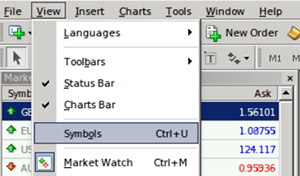
2. From the menu bar, click on View and select Symbols.
You may also simply open the Symbols window by entering Ctrl + U on your keyboard.
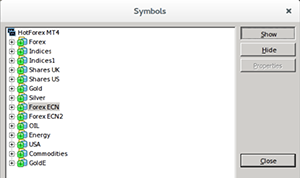
3. Select Forex ECN and click on Show button.
Repeat the same procedure for Forex ECN2 to list all Zero Spread instruments under the Market Watch section.
To hide the non-Zero instruments, select the required symbols and click on Hide.
Click on Close to return to MT4/MT5.
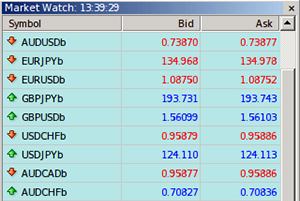
4. Under the Market Watch, you will now be able to view all the Zero Spread instruments which may be identified by the suffix b at the end of the symbol, such as, EURUSDb.
In addition to being easily identified by the suffix b at the end of the symbol, Zero Spread instruments are listed against a light blue layout (refer to illustration opposite).
Important:
Other non-Zero Spread symbols may also be listed on the Market Watch, however, those will not have b at the end of the symbol and will not be listed against the light blue background.
法律聲明: HF Markets (SV) Ltd 在聖文森和格林納丁斯註冊成立,是一家國際商業公司,註冊號碼為 22747 IBC 2015。
本網站由 HF Markets 集團營運並提供內容,該集團旗下公司包括:
風險提示: 交易外匯和相關產品等槓桿產品可能不適合所有投資者,因為它們會為您的資金帶來高風險。請務必在交易前充分了解相關風險,並考慮您的投資目標和經驗程度。如有必要,請尋求獨立建議。請閱讀完整的風險揭露。
HFM 不對某些司法管轄區的居民提供服務,包括美國、加拿大、蘇丹、敘利亞、伊朗、北韓、阿聯酋、土耳其等。